
One calendar for everything
Drag across dates to create a booking; every reservation — online or in-house — shows on a single timeline by vehicle.
See your whole operation on one calendar and book in seconds. RentalPilot checks availability in real time, so the same car can't be promised twice — whether the reservation comes from your team or your online booking site.
No credit card required · Live the same day
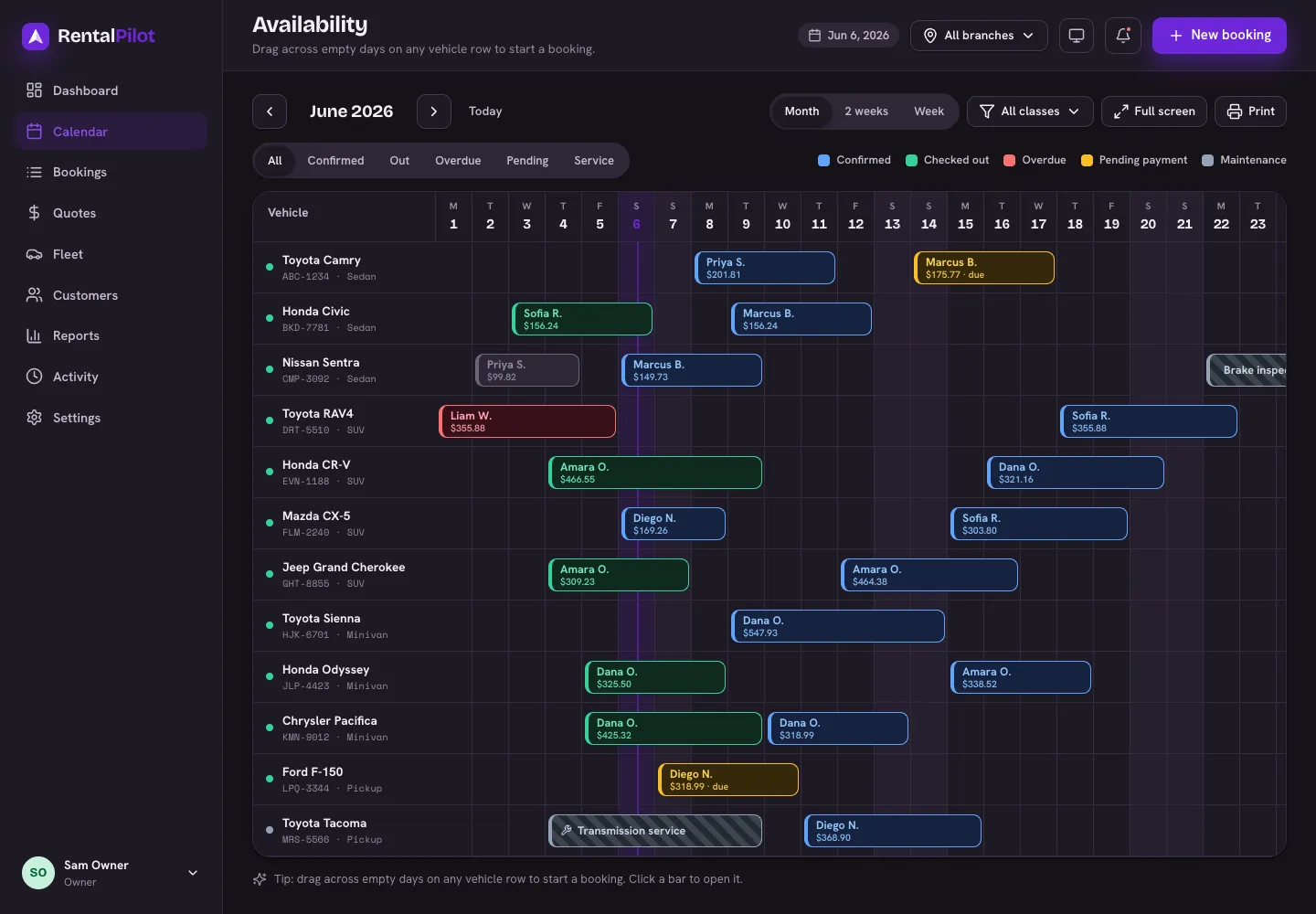
Drag across dates to create a booking; every reservation — online or in-house — shows on a single timeline by vehicle.
Availability is checked in real time against every confirmed and pending rental, so you can't promise a car that's already out.
Reserve a specific vehicle, or take pooled bookings by category and assign the actual car at pickup — capacity-checked either way.
Check-out and check-in with odometer, fuel and walk-around photos, then close the rental with an invoice — all from the same booking.
The classic independent-operator setup is a wall planner, a phone, and somebody's memory. It survives on the assumption that whoever takes the next booking knows what the last one was — which holds until two people are working at once, or the person with the memory takes a day off.
RentalPilot puts every reservation on a single timeline with one row per vehicle. Online bookings, phone bookings and walk-ins all land in the same place, colour-coded by status, so a glance tells you what's out, what's due back today and what's free tomorrow. Drag across a few days on a row to create a booking directly; click an existing one to open it.
Availability isn't a visual check you're trusted to do — it's enforced. Every reservation, from any source, is validated in real time against the confirmed and pending rentals already on that vehicle, so the same car cannot be promised to two customers. A vehicle marked in for maintenance drops out of availability automatically, and a retired vehicle disappears from every booking path while keeping its history.
The same rule applies to your online booking site, which is where double-bookings usually creep in. The public flow and your internal calendar read the same availability, so a customer booking at midnight can't take a car your team reserved at closing time.
Some operators promise an exact vehicle; others promise a category and assign whatever's clean and fuelled on the morning. RentalPilot supports both. In pooled mode a customer books a class rather than a car, capacity is checked against the whole category so it can't be oversold, and unassigned reservations sit in their own lane above the fleet rows until you assign a vehicle at pickup.
Categories are yours to define — economy, SUV, 4x4, van, whatever matches how you actually group your fleet — rather than a fixed list you have to bend your business around.
A reservation is the spine of the whole rental. Check-out captures the odometer, fuel level and walk-around photos, and the renter e-signs your rental agreement. On return, check-in captures the same readings, calculates mileage driven, and on paid plans an AI damage scan compares the two photo sets and flags likely new damage for you to review.
Then you close it: a branded PDF invoice or receipt, the deposit hold released or partly captured, and any post-rental charges — tolls, fines, mileage overage — billed to the card on file. Every action is stamped with who did it and when.
Yes — that's the normal case. Create a booking directly on the calendar by dragging across the dates you need, or from the new-booking form. Internal and online reservations are the same kind of record and share one availability check.
Availability is validated server-side against every overlapping confirmed and pending rental at the moment a booking is created, not just rendered on screen. Vehicles in maintenance or retired are excluded automatically, and pooled class bookings are checked against the category's total capacity.
Yes. You can extend a rental to a later return date — it reprices the booking and re-checks availability before committing — or cancel it with a reason recorded on the booking's timeline for later reporting.
Yes. The calendar handles touch as well as mouse — you can drag to create a booking on a tablet at the counter, and the whole operator dashboard is responsive down to phone size.
Bookings, fleet, payments, customers and reports — all in one place, from $29/mo with no commission.